CineBox
- 4.8
- Rating
- 50.00K
- Installs
- Free
- Price

 Analysis by App-foxy
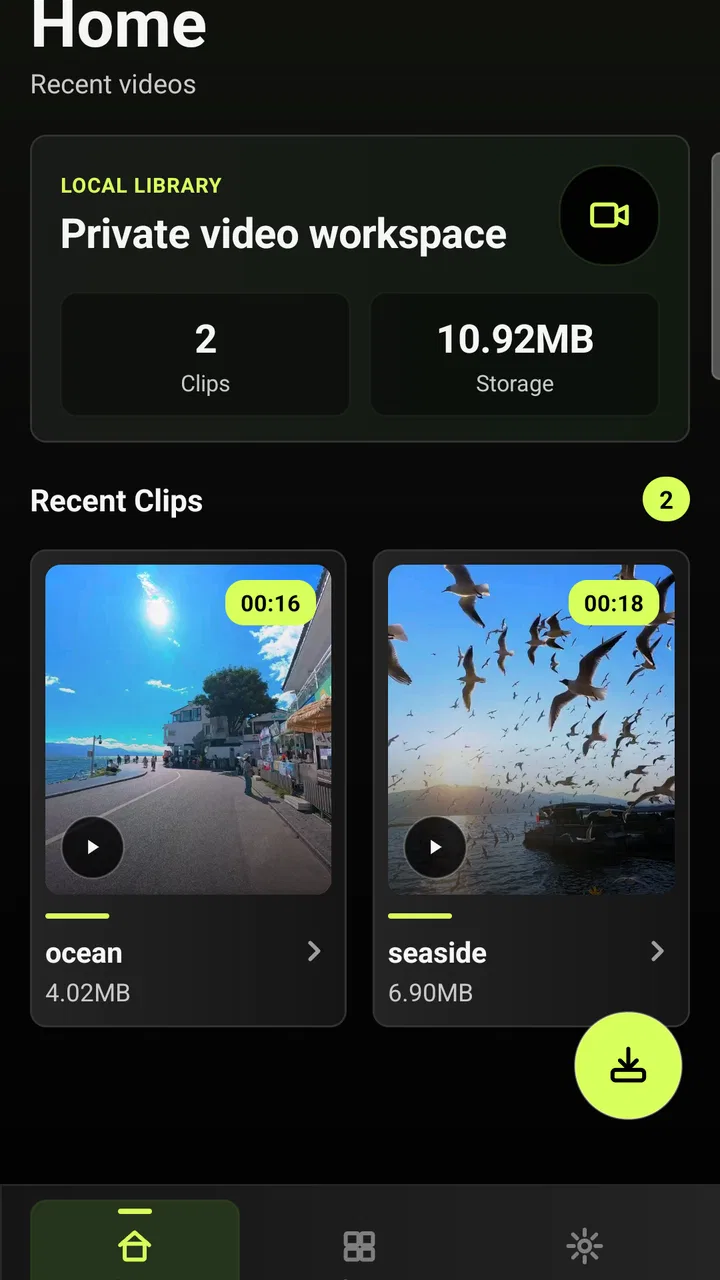
I installed CineBox expecting a simple video utility, but I found a more focused idea: it is meant to help me give personal videos a useful home instead of leaving them scattered through a camera roll. That sounds modest, yet it addresses a familiar problem. A phone can hold clips from trips, family events, projects, and saved moments, while the built-in gallery often treats everything as one long stream. CineBox approaches video viewing and organization as connected tasks.
My overall view is positive, with one important qualification. This is most appealing when I want a dedicated place for videos and a more intentional way to return to them. It is less convincing for someone who only needs to tap a clip and watch it immediately, or for someone expecting a full editing workstation. The app sits between a basic gallery player and a heavy video-editing suite, and that middle position is both its strength and its limitation.
What CineBox does well in everyday use
The app comes from DIGY SOFTECH and belongs to the video players and editors category, although my experience with it feels more centered on viewing and organizing than on advanced production. Its store summary presents the idea of giving each video a place, a tag, and a moment to return to. In practice, that framing matters because it encourages me to think about my library before I start searching through it.
You May Also Like

 Blood Strike: 2.5 Anniversary
Blood Strike’s Loadouts Turn Every Drop Into a Tactical Gamble
A close look at Blood Strike’s custom loadouts: how fast access to signature weapons reshapes its battle royale rhythm, rewards preparation, and narrows the gap between fights.

 Pandora - Music & Podcasts
Pandora’s Music Is Easy to Start, but Harder to Recover
Pandora’s strength is its low-effort path from a seed to a station. Its weak spot is how much confidence it asks you to place in connection, setup, and quiet recovery.

 8 Ball Pool
 Is Built on Rivalries, Rematches, and Routine
A close look at the rivalries, rematches, shared routines, and unanswered safety questions that turn a quick pool match into a persistent mobile community.

 Samsung Music
’s Quiet Strength Is Playing What You Already Own
Its reach comes less from spectacle than from dependable access to a personal library. That simplicity is both the app’s strongest retention engine and its ceiling.

 AccuWeather: Weather Radar
AccuWeather Review: A Quick, Clear Forecast for Everyday Decisions
For everyday plans, the best forecast is the one you can understand quickly. AccuWeather makes rain timing, radar, and local conditions easy to act on, with a few trade-offs.

 Hill Climb Racing
Why Hill Climb Racing Still Turns Crashes Into One More Run
A tiny car, a bumpy hill and one more upgrade: Hill Climb Racing keeps resurfacing because its simple chaos makes every near-miss feel personal.
More From Our News Desk



When I have several similar clips, a label can be more useful than a filename. A short recording from a weekend away might otherwise be buried among screenshots and automatically generated camera files. Assigning a meaningful tag creates a second route back to the clip. I can remember the subject or occasion rather than the day it was recorded, which is often how people actually search their own memories.
The strongest part of CineBox is the shift from “where is that file?” to “what was that video about?” That is a small change in thinking, but it makes the app more valuable for personal archives, school material, demonstrations, and recurring projects. It also makes the library feel curated without requiring me to build a complicated folder system.
I found this especially practical for a realistic everyday situation: after a family gathering, I might have several short clips showing the same event from different angles. Instead of relying on the phone gallery’s date order, I can treat them as a group, apply a shared idea, and return to them later when I want to make a selection or simply relive the day. The benefit is not flashy playback; it is reducing the mental effort needed to retrieve something I already own.
Tags are most useful when they stay consistent
There is a simple habit that makes the organizational side work better: use a small vocabulary. I would choose tags such as “travel,” “family,” “work,” “ideas,” or the name of a project, rather than inventing a different phrase for every clip. Consistency turns tagging into a search aid. If every video receives a unique description, the library can become just as difficult to browse as an unorganized gallery.
I also recommend tagging at the moment I finish reviewing a clip, rather than postponing the whole task. A few seconds of attention after recording is easier than trying to reconstruct the context weeks later. CineBox is therefore most effective as a routine, not as a one-time rescue operation for a disordered phone.
This is one of the app’s less obvious trade-offs. Organization tools reward discipline. If I do not maintain the structure, the advantage gradually fades. That is not a defect unique to CineBox, but it is important to understand before choosing it over the familiar gallery. The default gallery requires almost no setup, while this kind of dedicated workflow asks me to make a few decisions.
A calmer alternative to the default gallery
Compared with the standard gallery app on a phone, CineBox feels more deliberate. A gallery is usually designed to show everything quickly, including photos, downloads, screenshots, and clips. That is convenient when I want the newest item, but it can be noisy when I am trying to manage videos as their own collection.
Compared with a cloud photo service, CineBox is also a different proposition. Cloud-based tools are often better when I need broad device synchronization, automatic discovery, or a large media backup workflow. CineBox makes more sense when my priority is a focused video space and a personal system for returning to selected clips. I would not choose it as my only answer for a complex multi-device archive without first deciding how that archive should be backed up and accessed elsewhere.
Against a full editor, the distinction is clearer. Editing suites are the right choice for trimming sequences, combining clips, adding transitions, adjusting sound, or preparing a finished export. CineBox is better suited to the stage before that: finding the material, grouping it mentally, and keeping useful clips easy to revisit. If I open it expecting a timeline and production controls, I am likely to feel that it is too narrow. If I open it to make a video library less chaotic, its focus becomes an advantage.
Where the experience can feel limited
The same focus that keeps CineBox approachable may frustrate advanced users. People who want professional editing controls, detailed media conversion, or a broad set of creative effects should look toward a dedicated editor instead. A tagging-centered video library cannot replace a production tool, and I would not want it to pretend otherwise.
There is also a commitment involved in moving away from the phone’s default habits. The usual gallery is already familiar, fast to open, and closely tied to the camera. CineBox earns its place only when its organization is useful enough to justify opening another app. For a person with only a handful of clips, that extra step may not be worthwhile.
Another practical consideration is library size. A large collection benefits from careful naming and grouping, but it can also make the initial organization feel like work. I would start with the videos I return to most often instead of trying to classify everything in one sitting. That approach lets me test whether the app’s system matches my habits before investing more time.
My advice is to treat CineBox as a focused layer over a video collection, not as a replacement for every other media tool. Keep the original files in the place you normally trust, and use the app to make important clips easier to identify and revisit. That workflow reduces the risk of expecting one application to handle viewing, archiving, editing, and backup equally well.
Who should use it, and who should skip it
I would recommend CineBox to people who record many personal videos and regularly forget where they saved them. It should also appeal to students collecting project footage, families building a private memory library, and anyone who prefers labels and intentional grouping over a purely chronological feed. The app’s value grows when the videos have meaning beyond their filenames.
It is a particularly sensible choice for someone who has outgrown a mixed camera roll but does not want the complexity of a professional editor. The experience can provide a bridge between casual recording and organized personal media. I like that middle ground because it acknowledges that not every video needs to become a polished production.
I would skip it if my main goal is advanced editing. I would also hesitate if I rarely record video, never revisit older clips, or already have a reliable organization system that I use consistently. In those cases, the default gallery may be quicker and less demanding. People who need automatic cloud access across several devices should also compare their priorities carefully with what a dedicated video organizer offers.
The age classification is Teen, so families should use their normal judgment about whether the app fits a younger user’s device and media habits. CineBox is free, which makes trying its basic workflow less of a financial decision, but free does not remove the time cost of organizing a library. The real question is whether I will use the structure after setting it up.
Platform expectations and version details
CineBox is available for Android users running Android 8.0 or later. That gives it a reasonably broad compatibility range for people using older supported phones, while still making the operating-system requirement worth checking before installation. The current version is 1.2.2, and I would keep the app updated through the normal store process so that I am using the version intended by its developer.
The app has reached over 50 thousand installs and carries a 4.8 average from around 1.6 thousand ratings, with 73 written reviews. Those figures suggest that the concept has found a receptive audience, but I would interpret them alongside my own needs rather than treating popularity as proof that it will suit every library. An organizer can be highly useful to one person and unnecessary to another.
Because CineBox is free, I can evaluate the workflow without first committing money. My practical test would be simple: choose a manageable set of videos, give them consistent tags, close the app, and later see whether I can find the right clip more naturally than I could in the ordinary gallery. That test measures the app’s actual value better than simply browsing its interface once.
Small habits that make the app more useful
My first tip is to organize around future questions. Instead of asking, “What should I call this file?” I would ask, “How will I look for it later?” A tag based on an event, person, project, or purpose is usually more helpful than a vague label such as “video.” This turns the app into a memory aid rather than another storage drawer.
My second tip is to separate reference clips from sentimental clips in the way I think about them. A tutorial recording may need a project-oriented tag, while a birthday clip may be easier to find by occasion. Mixing both types under generic labels can make browsing less clear. A little attention to the reason I kept a clip helps the library remain useful.
My third tip is to avoid trying to recreate a professional folder hierarchy inside a lightweight organizer. Too many categories can make the system slow to maintain. I would begin with broad tags and add detail only when I notice a genuine retrieval problem. The best structure is the one I will still use after the novelty wears off.
A fourth useful workflow is to use CineBox before editing elsewhere. I can review the collection, identify the clips that belong to a project, and then move to an editor with a clearer plan. This reduces the time spent scrolling through unrelated recordings. It also keeps the creative decision separate from the technical work of assembling a final video.
These habits reveal the app’s real identity. It is not trying to win by offering the longest feature list. Its usefulness comes from making a neglected part of video ownership—remembering, grouping, and returning—feel manageable. That is a narrower promise, but a credible one.
My final recommendation
CineBox is a thoughtful choice for Android users who want a dedicated way to bring order to personal videos. I appreciate its emphasis on places, tags, and revisiting clips because those are the moments when a basic gallery often feels inadequate. The app is free, focused, and easier to justify when my video collection is growing faster than my ability to remember it.
Still, I would not present it as a universal video solution. It is not the right pick for advanced editing, elaborate production work, or a complete cloud-backup strategy. Its organization-first approach also asks me to build a habit, and users who want zero-maintenance browsing may prefer the gallery already installed on their phone.
My verdict is that CineBox is worth trying if I regularly record videos and want to find meaningful clips by context rather than by date. I would start small, use consistent tags, and judge it after a week of real retrieval rather than after a quick first launch. For that audience, CineBox turns a loose collection of recordings into a more intentional video library; for everyone else, its focused workflow may be more structure than they need.
FAQs for CineBox
01What is CineBox and what can I use it for?
CineBox is an entertainment app designed to help users discover movies and, depending on the available version, browse information such as titles, genres, ratings, descriptions, casts, trailers, and release details. Its exact features can vary by region and platform, so you should review the app listing carefully before downloading. It may function primarily as a catalog or discovery tool rather than a complete streaming service.
02Is CineBox free to download and use?
CineBox may be available to download at no initial cost, but free access does not always mean that every feature is free. Some versions can include advertising, optional subscriptions, in-app purchases, or links to external services. Before installing, check the official store page for pricing details and read the permissions and subscription information so you understand whether any charges may apply.
03Can I watch movies and TV shows directly in CineBox?
The ability to stream content depends on the specific CineBox version, country, licensing agreements, and the platform where it is installed. Some editions may provide movie information, trailers, or links to legitimate providers instead of hosting full titles. Availability can also change over time. Confirm the app’s current description and supported services before assuming that complete movies or series can be watched inside the app.
04Is CineBox safe to install on Android or iPhone?
For the safest experience, download CineBox only from a trusted official app store or the developer’s verified website, and avoid modified APK files or unknown download pages. Check the developer name, recent reviews, update history, privacy policy, and requested permissions before installation. If the app requests access that seems unrelated to its entertainment features, consider cancelling the installation and choosing a safer alternative.
05What should I do if CineBox does not work or content is unavailable?
If CineBox fails to load, crashes, or shows unavailable content, first check your internet connection, update the app, restart your device, and clear the application cache where supported. Availability may also be affected by regional restrictions, licensing changes, server problems, or an outdated version. If these steps do not help, consult the developer’s support page or contact the official support channel rather than downloading an unofficial replacement.
Pros
- Large catalog of movies and TV shows in one place.
- Simple interface makes browsing titles quick and convenient.
- Search tools help users find specific content easily.
- Supports streaming on compatible Android and iOS devices.
- Useful option for discovering lesser-known entertainment titles.
Cons
- Content availability may vary by region and change without notice.
- Some videos may have inconsistent quality or playback performance.
- Ad interruptions can affect the viewing experience.
- The app may require a stable
- fast internet connection.
- Privacy and licensing details should be checked before downloading.

CineBox
Gallery